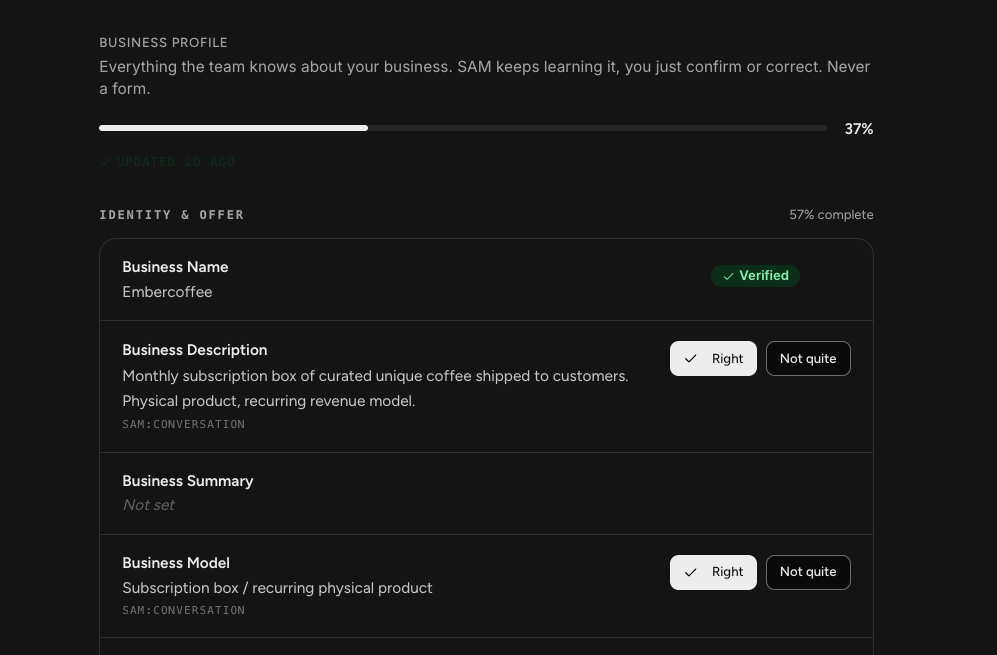
Your business profile is everything Sam knows about your business, and the one place you can shape it directly.
Sam builds it as it goes, from your website, your connected platforms, and your conversations. Your job is not to fill in a form. It is to confirm what Sam got right and correct what it got wrong.
This matters more than it looks. Everything your team produces draws on this profile, so a wrong detail here shows up in the work later.
Finding Your Business Profile
Select the profile icon in the bottom left corner, choose Settings, then Business Profile under Business Line.
You can also reach it from the last step of setup, using Or not quite right? Edit these settings.
How Your Profile Gets Filled In
Three ways, and they all happen without you typing anything.
- Your website. The scan during setup pulls in your brand, what you sell, and how you describe it.
- Your connected platforms. Connecting your ad accounts, store, or email platform lets Sam fill in real numbers such as ad spend, campaign performance, and list size.
- Your conversations. Anything you tell Sam while working can become part of the profile.
Each field shows where its value came from, so you can see whether something was learned from your site, pulled from a connected platform, or picked up in conversation.
NOTE: If your profile looks sparse, the usual reason is that only your website has been scanned. Connecting more platforms fills in a lot, particularly the paid advertising and reporting sections, which need real data Sam cannot get from a website.
What's in the Profile
The profile is grouped into eight sections, each with its own completion score.
- Identity & Offer: what your business is, what you sell, how you position it, and your pricing.
- Audience: who you sell to, their demographics and motivations, and your email list.
- Paid Acquisition: ad spend, budget, campaign performance, and what creative is working.
- Organic Content: which platforms you post on, how often, engagement, and what performs.
- Infrastructure: your commerce platform, payment processor, funnel setup, and currency.
- Goals: your primary goal, budget, timeline, risk tolerance, and what has not worked before.
- Reporting: the metrics you watch, your baselines, and how often you want reporting.
- Assets: your winning ad hooks, long-form content, and full product catalog.
Confirming and Correcting
Fields fall into a few states.
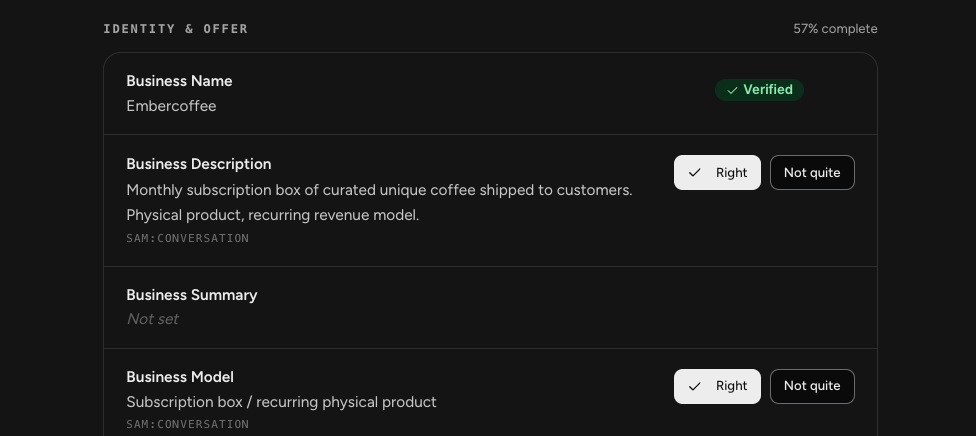
- Verified: Sam is confident in this one, usually because it came from a scan or a connected platform.
- Right and Not quite: Sam has a value but wants you to check it. Select Right to confirm, or Not quite to open a field and enter the correct value yourself.
- Not set: Sam has not learned this yet. It fills in as you connect more platforms and work with your team.
Working through the fields Sam is unsure about is one of the highest-value things you can do early, because each correction improves everything your team produces afterward.
Completion Scores
A percentage at the top shows how complete your profile is overall, with a score on each section.
These climb as content fills in, whether you added it or Sam learned it. Use them to spot which areas Sam knows least about. A low Reporting score, for example, means Sam has little idea which metrics you care about.
Your Business Profile and Sam's Memory
Sam builds other memory as it works, picking things up from your conversations and files without being asked.
Your business profile is different. It is the dedicated record of your business, structured into known fields, and the one you can shape directly. Both feed the work your team does.
Archiving a Business Line
At the bottom of your business profile is the option to archive the business line. Archiving removes it from your workspace, and everything associated with it, including conversations, content, products, and subscriptions, becomes inaccessible.
NOTE: Your data is preserved, but you cannot restore an archived business line yourself. Restoring one requires contacting SamCart support, so treat archiving as something to be sure about rather than something to try.
Frequently Asked Questions
Q: Why does my business profile look so empty?
A: Most likely only your website has been scanned. Sections such as Paid Acquisition and Reporting need data from connected platforms, so connecting your ad accounts, store, or email platform fills in a lot.
Q: Can I fill in fields myself?
A: Yes. Use Not quite on any field to open an entry box and enter what you want. You can also just tell Sam in a conversation.
Q: What does Verified mean?
A: Sam is confident in that value, usually because it came from your website scan or a connected platform rather than being inferred.
Q: Does the completion percentage matter?
A: It is a guide, not a target. It shows where Sam knows least about your business, and a fuller profile means better work, particularly in the areas you care most about.
Q: How is this different from Sam's memory?
A: Sam builds memory on its own as it works. Your business profile is the structured record of your business specifically, and the one you can edit directly.
Q: Can I undo archiving a business line?
A: Not on your own. Your data is preserved, but restoring an archived business line requires contacting SamCart support.